
Why Professional Auctioneers Trust aListEngine for Faster, Smarter Cataloging
See why auctioneers and resellers are switching to aListEngine for AI-powered cataloging: faster listings, fewer errors, and more time back in the week.
In this article
Every auctioneer and reseller eventually hits the same wall: the business is growing, the consignments keep coming in, but there are only so many hours in a day to catalog it all. That’s usually the moment auctioneers start looking for a better way to work, and it’s exactly why more of them are turning to aListEngine.
It’s not one single feature that earns that trust. It’s the whole workflow, from the moment you snap a photo to the moment a listing is ready to import into HiBid or K-Bid. Here’s a closer look at what’s actually inside aListEngine, and why each piece matters to someone running real auctions.
AI-Generated Titles, Descriptions, and Pricing
This is where the time savings start. Instead of typing out a title, writing a description, and researching a fair price for every single lot, you upload photos and aListEngine drafts all three for review. You can choose Quick, Standard, Enhanced, or Thorough analysis depending on how much attention the item needs.
For an auctioneer working through a warehouse full of consignments, this single feature is usually the difference between cataloging taking days instead of hours. A quick pass might be all a low-value lot needs; a thorough pass makes sense for the higher-ticket pieces where getting the description exactly right actually moves the final bid.
AI Insights on Every Listing
Cataloging isn’t just about writing a description. It’s about knowing what you’re looking at. Every listing in aListEngine comes with AI Insights: extra context about the item surfaced alongside the draft, so you have more to work with before you review and publish.
This matters especially for auctioneers handling unfamiliar categories. You don’t need to be an expert in every type of item that comes through your door when the tool is already surfacing the details that matter.
Bulk Photo Import for High-Volume Cataloging
Anyone who’s cataloged 200 lots in one sitting knows the real bottleneck isn’t writing descriptions one at a time. It’s getting through the sheer volume. aListEngine lets you upload hundreds of photos at once, then use barcode markers and photo ordering to separate the batch into individual listings.
Instead of opening a new listing screen for every item, you drop in a whole batch, check the lot boundaries, and process the listings together. Duplicate detection helps keep the batch clean before those drafts are created.
One-Click Export to Auction Platforms and Marketplaces
Creating a great listing is only half the job. It also has to get onto the platforms where your bidders actually are. aListEngine prepares downloadable files for HiBid and Auction Flex, K-Bid, BidWrangler, Equip-Bid, LiveAuctioneers, EstateSales.NET, Shopify, eBay, and universal spreadsheet workflows.
Each target applies the format and image settings that platform expects. You still review the result and import it into the destination platform, but you do not have to rebuild every listing by hand.
Custom AI Instructions Per Folder and Team
Every auction house has its own voice and its own standards, including the level of detail expected, the tone used, and the way condition is described. aListEngine lets you set the tone, format, and detail level per folder, so prompt templates keep output consistent no matter who on your team is running the analysis.
That consistency matters more than it sounds. Bidders get used to how your listings read, and inconsistent quality can quietly erode trust in your brand over time, even if every fact is accurate.
Team Collaboration with Shared AI Credits
Cataloging is rarely a one-person job once an auction house grows past a certain size. aListEngine supports inviting your team and sharing folders with fine-grained permissions, all under one account with a shared credit pool.
That means your whole team, from part-time help during peak season to full-time staff, can work from the same system without duplicate accounts or scattered spreadsheets tracking who did what.
Folder Sharing to Keep Every Sale Organized
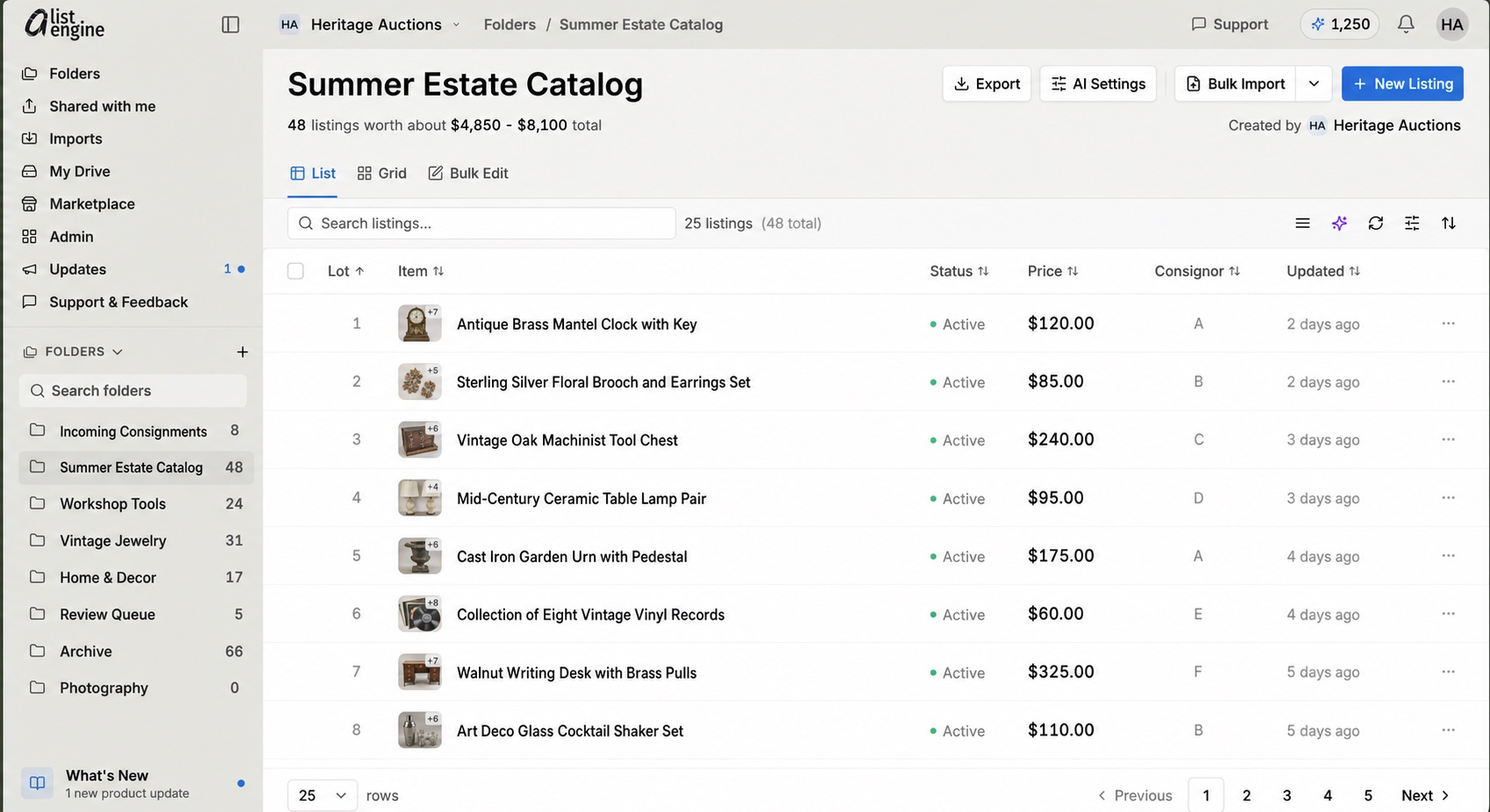
Instead of one giant, unsorted pile of listings, aListEngine lets you create a separate folder for each sale or project. Each folder holds its listings, imports, exports, collaborators, and activity in one place.
For auctioneers juggling multiple sales at once, such as a monthly consignment auction, a summer clearance event, or an estate sale, this kind of structure is the difference between a smooth week and a chaotic one.
Mobile Camera Workflow for Field Cataloging
A lot of cataloging work doesn’t happen at a desk. It happens on-site, at a storage unit, a warehouse, or a client’s home during intake. aListEngine’s mobile camera workflow lets you capture photos directly using quick-shot and continuous camera modes, so you can photograph items faster during intake and move them straight into the right folder.
This is one of those features that sounds small until you’ve used it. Cutting out the step of transferring photos from a phone to a computer before cataloging can even begin saves real time on every single intake day.
Know What’s Missing From Every Listing
Perhaps the most underrated feature: for every listing, aListEngine tells you what’s clear from your photos, what isn’t, and what extra photos or details would improve the result. Gaps get flagged and fixed before the listing goes live, not after a bidder points them out in the comments.
This directly addresses one of the most expensive mistakes in manual cataloging: the incomplete or unclear listing that leads to a lower final bid, a return request, or a frustrated buyer. Catching that gap before publishing, rather than after, is exactly the kind of thing that protects both your sale prices and your reputation.
Why All of This Adds Up to Trust
None of these features exist in isolation. Together, they cover the entire cataloging workflow, from the first photo taken in the field to the final export onto HiBid or K-Bid. This is exactly why the answer from aListEngine users has consistently been that the tool solves a real, everyday problem rather than a hypothetical one.
Auctioneers using the platform often talk about getting evenings and weekends back, or finally having room to take on more consignments without needing to hire additional cataloging staff. That’s not a coincidence. It’s what happens when every step of the process, from bulk import to platform export, is built around the way auction professionals actually work.
Want to see it for yourself? Explore how aListEngine works and find out what your next sale could look like with hours of cataloging time back on your calendar.